The Jewel Bank lets you store jewels account-wide, freeing up your bag and keeping them safe. You can also price your personal store in jewels instead of Zen.
Jewel Bank: press J
- In game, press J to open the Jewel Bank. This storage is shared across every character on the account.
- Deposit: hold Ctrl and right-click a jewel in your bag. All jewels of that type go into the bank.
- Withdraw: each jewel row has
-1/-10/-30/Allbuttons. Click to withdraw that many to your bag.
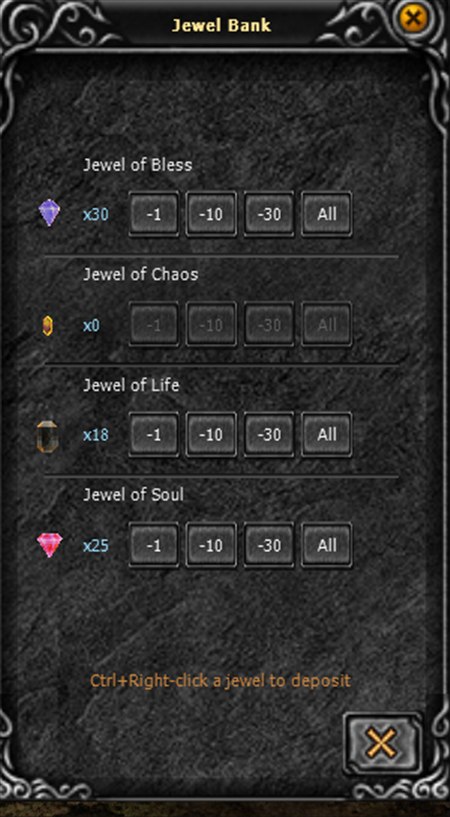
- Shared account-wide: deposit on one character, withdraw on another.
- Free, costs no Zen.
- Jewels in the bank are safe: never dropped on death or from PK.
- Withdrawing needs free bag slots; if the bag is nearly full it only withdraws as many as fit.
Selling priced in jewels
You can set your personal store to sell in a jewel instead of Zen: buyers pay in that jewel and you receive jewels.
- Open your personal store, arrange the items and set a price on each as usual.
- In the store, use the "Sell in" strip to pick the currency: Zen or a jewel. Each item price is now counted in that currency.
- Open the store. Buyers pay in the exact jewel you chose.
When someone buys
- The buyer pays jewels: from their bag first, then from their Jewel Bank if short.
- You (the seller) receive the jewels straight into your Jewel Bank, plus an "Item sold" letter telling you who bought what.
- Works with offline store (/offstore): keep selling in jewels while the game is closed.
Notes
- Requires the latest client: just start the game through the Launcher and it updates itself.
- Supported jewels: Bless, Soul, Life, Chaos.
Updated 09/07/2026